Shapes
addShape(): every ShapeType, plus fills, outlines, shadows and rounded corners.
0Namespaces used by the C# samples
using NetCorePpt;                  // PptxGen, Slide
using NetCorePpt.CoreInterfaces;   // option objects: TextProps* / ShapeProps / ImageProps / TableProps / HAlign / VAlign ...
using NetCorePpt.CoreEnums;        // ShapeType, ChartType, MediaType, ShadowType, BulletType, DashType, SCHEME_COLORS ...
using TableRow = System.Collections.Generic.List<NetCorePpt.CoreInterfaces.TableCell>;
Almost 200 shape types can be added to Slides — the values live in the ShapeType enum in NetCorePpt.CoreEnums (ShapeType.rect, ShapeType.roundRect, …).
Usage
PptxGenJS · typescript
// Shapes without text
slide.addShape(pres.ShapeType.rect, { fill: { color: "FF0000" } });
slide.addShape(pres.ShapeType.ellipse, {
  fill: { type: "solid", color: "0088CC" },
});
slide.addShape(pres.ShapeType.line, { line: { color: "FF0000", width: 1 } });

// Shapes with text
slide.addText("ShapeType.rect", {
  shape: pres.ShapeType.rect,
  fill: { color: "FF0000" },
});
slide.addText("ShapeType.ellipse", {
  shape: pres.ShapeType.ellipse,
  fill: { color: "FF0000" },
});
slide.addText("ShapeType.line", {
  shape: pres.ShapeType.line,
  line: { color: "FF0000", width: 1, dashType: "lgDash" },
});
NetCorePpt · C#
// Shape names are the same - `pres.ShapeType.rect` becomes `ShapeType.rect`
// (or `pptx.shapeType.rect` if you prefer the instance form).

// Shapes without text
slide.addShape(ShapeType.rect, new ShapeProps { fill = new ShapeFillProps { color = "FF0000" } });
slide.addShape(ShapeType.ellipse, new ShapeProps { fill = new ShapeFillProps { type = ShapeFillType.solid, color = "0088CC" } });
slide.addShape(ShapeType.line, new ShapeProps { line = new ShapeLineProps { color = "FF0000", width = 1 } });

// Shapes with text
slide.addText("ShapeType.rect", new TextPropsOptions { shape = ShapeType.rect, fill = new ShapeFillProps { color = "FF0000" } });
slide.addText("ShapeType.ellipse", new TextPropsOptions { shape = ShapeType.ellipse, fill = new ShapeFillProps { color = "FF0000" } });
slide.addText("ShapeType.line", new TextPropsOptions
{
    shape = ShapeType.line,
    line = new ShapeLineProps { color = "FF0000", width = 1, dashType = DashType.lgDash },
});
Properties
Position/Size Props ( PositionProps )
| Name | Type | Default | Description | Possible Values |
|---|---|---|---|---|
x | number | 1.0 | hor location (inches) | 0-n |
x | string | hor location (percent) | 'n%'. (Ex: {x:'50%'} middle of the Slide) | |
y | number | 1.0 | ver location (inches) | 0-n |
y | string | ver location (percent) | 'n%'. (Ex: {y:'50%'} middle of the Slide) | |
w | number | 1.0 | width (inches) | 0-n |
w | string | width (percent) | 'n%'. (Ex: {w:'50%'} 50% the Slide width) | |
h | number | 1.0 | height (inches) | 0-n |
h | string | height (percent) | 'n%'. (Ex: {h:'50%'} 50% the Slide height) |
Shape Props ( ShapeProps )
| Name | Type | Description | Possible Values |
|---|---|---|---|
align | string | alignment | left or center or right. Default: left |
fill | ShapeFillProps | fill props | Fill color/transparency props |
flipH | boolean | flip Horizontal | true or false |
flipV | boolean | flip Vertical | true or false |
hyperlink | HyperlinkProps | hyperlink props | (see type link) |
line | ShapeLineProps | border line props | (see type link) |
rectRadius | number | rounding radius | 0 to 1. (Ex: 0.5. Only for pptx.shapes.ROUNDED_RECTANGLE) |
rotate | number | rotation (degrees) | -360 to 360. Default: 0 |
shadow | ShadowProps | shadow props | (see type link) |
| objectName | string | optional shape name | Ex: "Customer Network Diagram 99" |
Examples
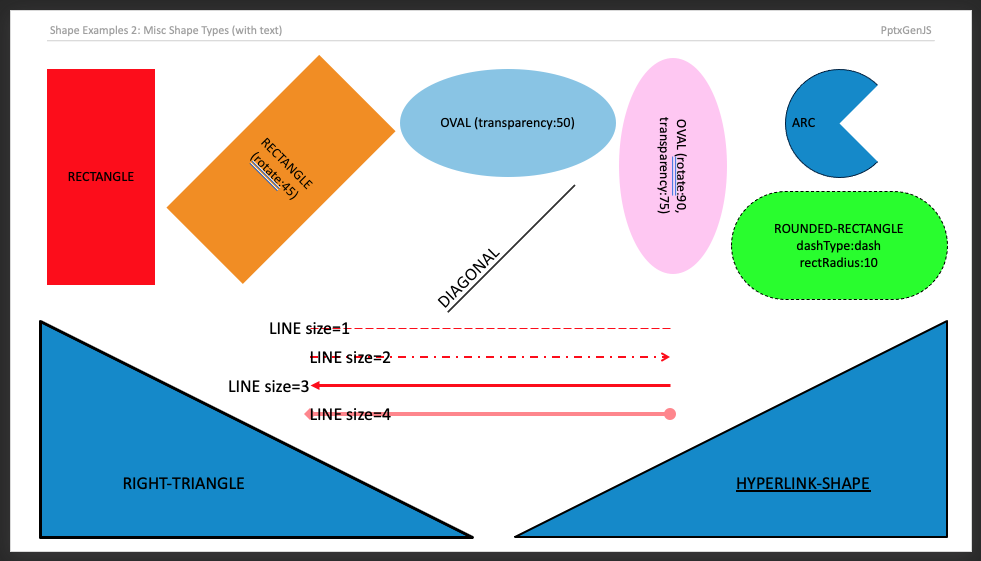
Samples
Runnable C# samples: see the Usage Examples section of this site.