Shapes and Schemes
The ShapeType catalogue and the scheme-colour palette, with live previews.
0Namespaces used by the C# samples
using NetCorePpt;                  // PptxGen, Slide
using NetCorePpt.CoreInterfaces;   // option objects: TextProps* / ShapeProps / ImageProps / TableProps / HAlign / VAlign ...
using NetCorePpt.CoreEnums;        // ShapeType, ChartType, MediaType, ShadowType, BulletType, DashType, SCHEME_COLORS ...
using TableRow = System.Collections.Generic.List<NetCorePpt.CoreInterfaces.TableCell>;
PowerPoint Shape Types
The library comes with over 180 built-in PowerPoint shapes.
- Shape names live in the
ShapeTypeenum (NetCorePpt.CoreEnums) —ShapeType.rect,ShapeType.roundRect,ShapeType.chevron, … - Your IDE completes every value; the sidebar of this page lists the categories
PowerPoint Scheme Colors
Scheme color is a variable that changes its value whenever another scheme palette is selected. Using scheme colors, design consistency can be easily preserved throughout the presentation and viewers can change color theme without any text/background contrast issues.
- Scheme color names live in the
SchemeColorenum (NetCorePpt.CoreEnums) —SchemeColor.accent1,SchemeColor.dk1,SchemeColor.lt2, … - Your IDE completes every value; the sidebar of this page lists the categories
To use a scheme color, set a color constant as a property value:
PptxGenJS · javascript
slide.addText("Scheme Color 'text1'", { color: pptx.SchemeColor.text1 });NetCorePpt · C#
// `pptx.SchemeColor.text1` on the JS side -> `pptx.schemaColor.text1` in C#
slide.addText("Scheme Color 'text1'", new TextPropsOptions { color = pptx.schemaColor.text1 });

// The static SchemeColor class carries the same set of names:
// slide.addText("Accent 3", new TextPropsOptions { color = SCHEME_COLORS.accent3 });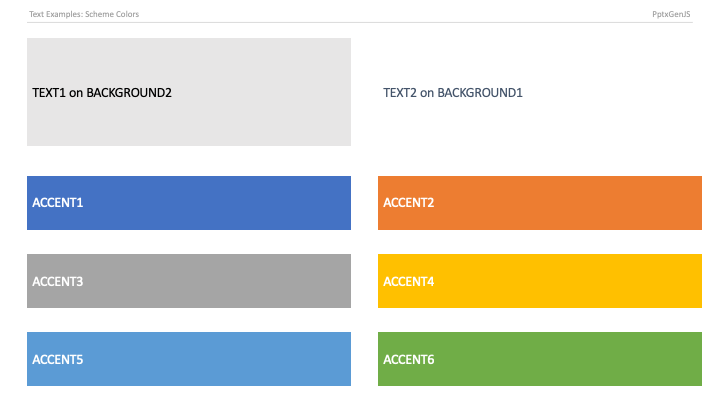
PptxGenJS · typescript
export enum SchemeColor {
    "text1" = "tx1",
    "text2" = "tx2",
    "background1" = "bg1",
    "background2" = "bg2",
    "accent1" = "accent1",
    "accent2" = "accent2",
    "accent3" = "accent3",
    "accent4" = "accent4",
    "accent5" = "accent5",
    "accent6" = "accent6",
}
NetCorePpt · C#
// NetCorePpt mirrors this enum. Pick the style that fits your code base:

// 1) Instance form, exposed on the presentation object:
slide.addText("Accent 1", new TextPropsOptions { color = pptx.schemaColor.accent1 });

// 2) Static class (same values):
//   SchemeColor.text1        SchemeColor.text2
//   SchemeColor.background1  SchemeColor.background2
//   SchemeColor.accent1 ... SchemeColor.accent6
//
// 3) Or work with the OOXML scheme names directly:
//   SCHEME_COLORS.tx1 / tx2 / bg1 / bg2 / accent1 ... accent6